
For years, traditional SEO focused on optimizing for the 10 blue links in Google’s SERPs, but that can’t be your only focus now.
AI-powered tools like ChatGPT, Google’s AI Overviews, and Gemini are now delivering direct answers often without users ever clicking a search result.
This case study breaks down how my team at The Search Initiative adapted our already successful SEO strategy with an AI search focus by using log file analysis to understand AI bot behaviour, implementing structured data to boost visibility in AI-generated results and optimizing content for multimodal (text, images, videos etc) support.
The results?
Our client’s monthly AI referral traffic grew by 1,400%

… And is appearing for 164 keywords within AI overviews in the U.S.
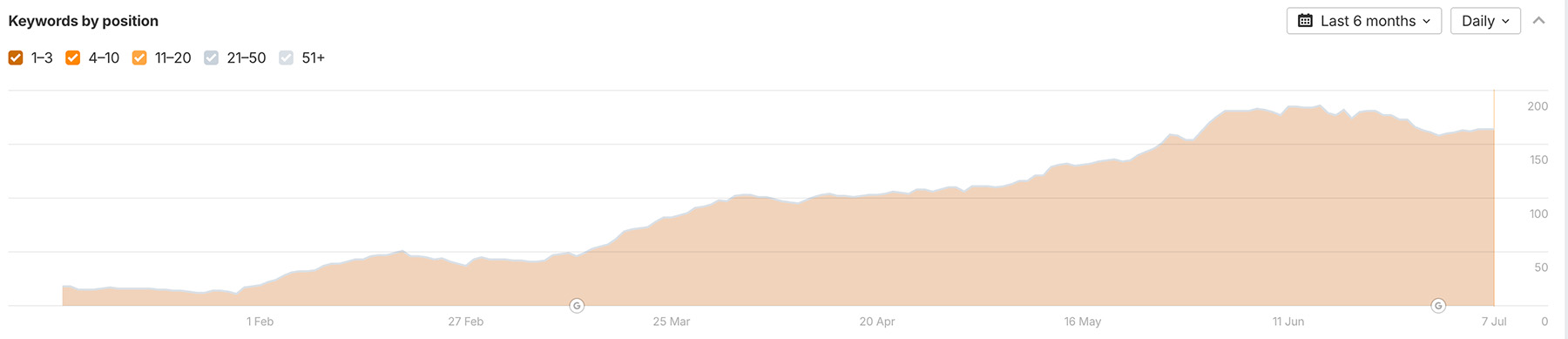
In this case study, you’ll learn how to:
 Analyze your website’s log files using AI to uncover valuable insights about how AI platforms and Google are crawling your website
- Implement relevant structured data to improve your visibility on Google’s AI search features
- Better answer user queries with multimodal content
If you’d prefer to watch rather than read, I cover some of the key insights in this video.
The Challenge
The client specializes in providing commercial plant supplies to businesses across the United States, you might recognize them from this case study.
We’d already delivered strong results in traditional organic search (and we’ve kept that momentum going), but with AI search rapidly reshaping how users find answers, it was clear we couldn’t afford to stand still. If we didn’t act fast, the client risked being left behind while competitors claimed top visibility in AI-generated results.

First, we used AI to analyze their server log files and uncover how platforms like ChatGPT, Gemini and Perplexity were actually crawling the site to reveal gaps, missed pages, and errors.
Then, we implemented structured data (like FAQ and Article schema) to improve how AI interpreted the content, boosting their chances of showing up in AI-generated results.
Finally, we guided AI systems toward their most valuable content by supporting textual content with multimodal formats like images, videos, and tables to improve how it’s parsed, summarized, and shown in AI-generated results.
Here’s how we did it.
AI-Powered Log File Analysis
In the age of AI-first search experiences, understanding how your website is crawled has never been more important. One of the most powerful, underused data sources that can help with this, is looking at your server’s log files.
I’ll show you how to extract, analyze, and visualize log file data using GPT-4o to get valuable insights.
What are Log Files?
Log files are plain-text records generated by your web server that track every single request made to your site by a real user interacting with your site or a search engine bot discovering your pages.
Each entry typically includes details like:
- The time of the request (aka timestamps)
- The IP address that is making the request
- Which user-agents (such as Googlebot or ChatGPT) have crawled your website
- The URLs that were requested and their status code (for example, 404 not found for pages that don’t exist).
Here’s what one typically looks like:
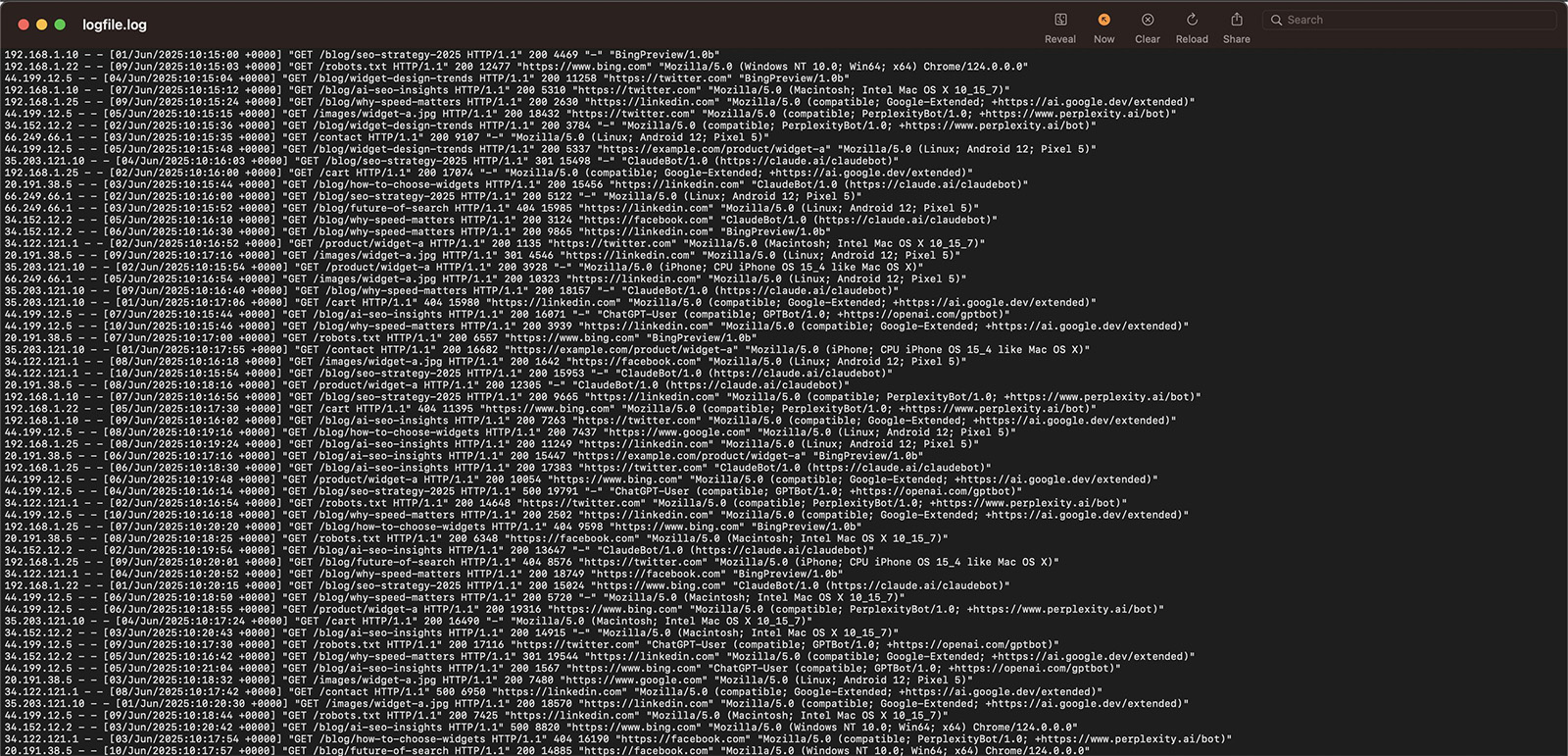
These files act like a website diary, capturing both user visits and bot activity, and are essential for understanding how the server handles requests.
Why are Log Files Important for AI SEO?
Analyzing these log files can help you understand exactly how AI systems and search engine bots interact with your site, making it a valuable tool for improving your site’s visibility in both traditional and AI-powered search.
By reviewing raw server logs, you can see how frequently different bots (like Googlebot, Bingbot, and AI crawlers) visit your site, which pages they prioritize, and whether they’re running into technical barriers that could impact indexing or AI understanding.
For example, as you’ll read soon below, we discovered that a portion of our client’s pages weren’t being visited by AI models due to a lack of internal links. Since making a simple fix by adding more internal links to and from these pages, the number of hits from AI has started to vastly increase.
For AI SEO, log file analysis can help you:
- Identify which pages are crawled most and least by search bots and AI tools
- Confirm that your most important content is accessible and consistently crawled
- Spot low-value pages that may be wasting crawl budget (the resources these bots allocate to crawling your website) and diluting AI visibility
- Catch HTTP status code errors (like 404s) or broken redirects that block access to key pages
- Detect slow-loading pages that reduce crawl efficiency and impact AI rankings
- Find orphan pages (pages with no internal or external links pointing to them) that bots and AI models may skip
- Monitor crawl frequency trends to catch spikes, drops, or irregular behavior that may point to broader technical issues
How to Access Your Log Files
You can access your website’s log files directly from your server.
Many hosting providers (like Hostinger or SiteGround) offer a built-in file manager where these logs are stored.
To download them:
- Log in to your hosting dashboard or control panel
- Open the section labeled “File Manager,” “Files,” or “File Management”
- Navigate to the folder that contains your log files—often named logs, access_logs, or similar
- Download the relevant log files to your computer for analysis
Read on to find out what to do once you’ve downloaded your log file.
Using AI to Gain Log Files Insights & Visualization
Once you have your log file, you can use it to gain a bunch of insights about your site’s SEO.
You’ll need GPT-4o or ChatGPT Plus, Team, and Enterprise in order to do this.
1. Upload your log file by clicking on the “+” sign, with the following prompt, making sure GPT-4o is enabled.

I have attached raw access log files from my website’s server. Please analyze the logs focusing on both Googlebot and AI crawlers such as GPTBot (ChatGPT), ClaudeBot, PerplexityBot, and Google-Extended (Gemini).

Identify all hits from user agents containing any of the following keywords: “google”, “gptbot”, “claudebot”, “perplexitybot”, or “google-extended”.

Once you’ve analyzed this, I will ask you to perform a series of tasks.
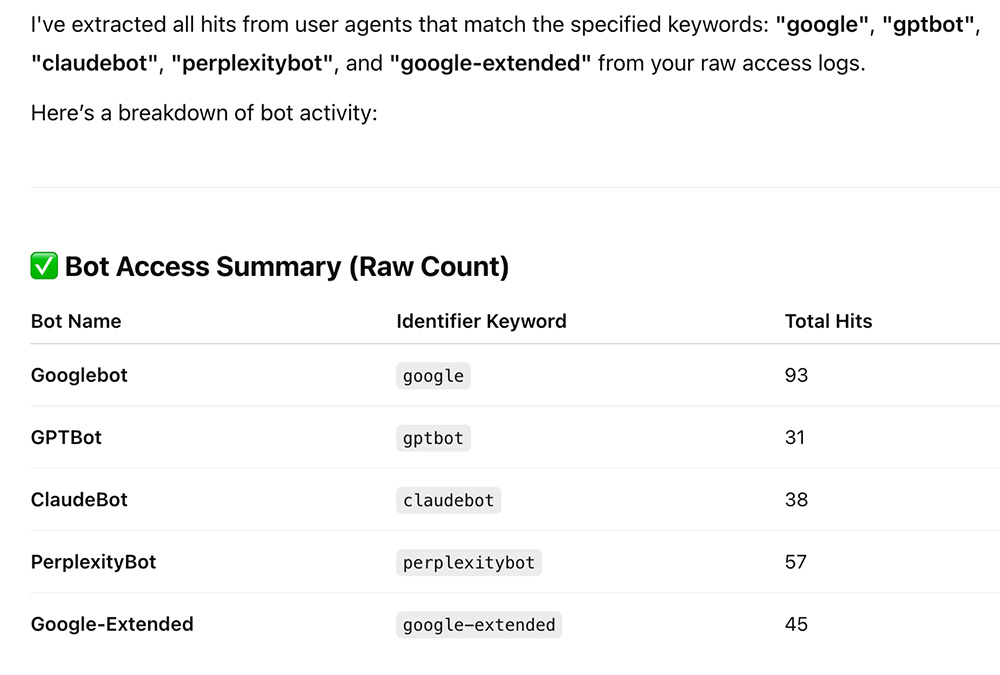
Here’s the result from GPT:
2. Now enter this prompt:
Create a chart that shows how these bots have crawled my site over time.
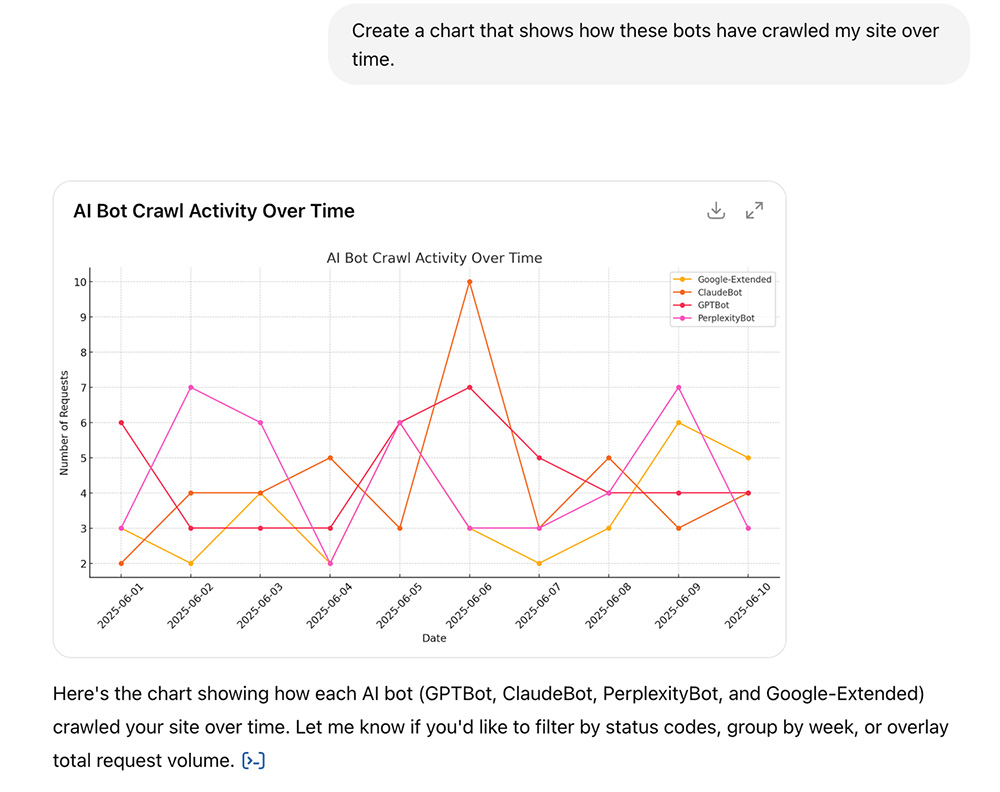
The chart shows how frequently the bots have crawled your site over time.
3. Now enter this prompt:
Break down the data by HTTP status code (e.g. 200, 301, 404, 410).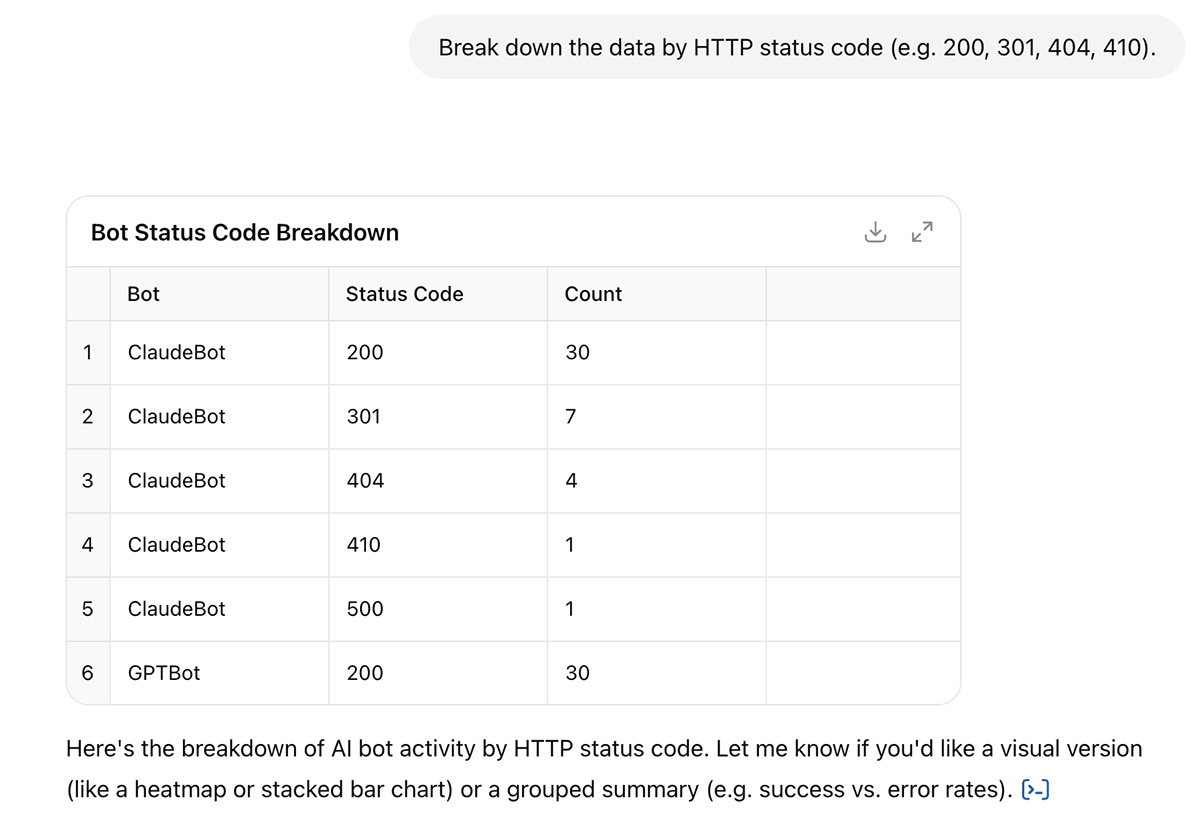
This will be useful for a later prompt, where we’ll ask GPT to gather any insights where pages are being crawled by bots, but for example, cannot be found.
4. Now enter this prompt:
Provide a list of the 10 pages that receive the fewest hits from AI bots and Google and create a visual diagram (e.g. bar chart) of these pages.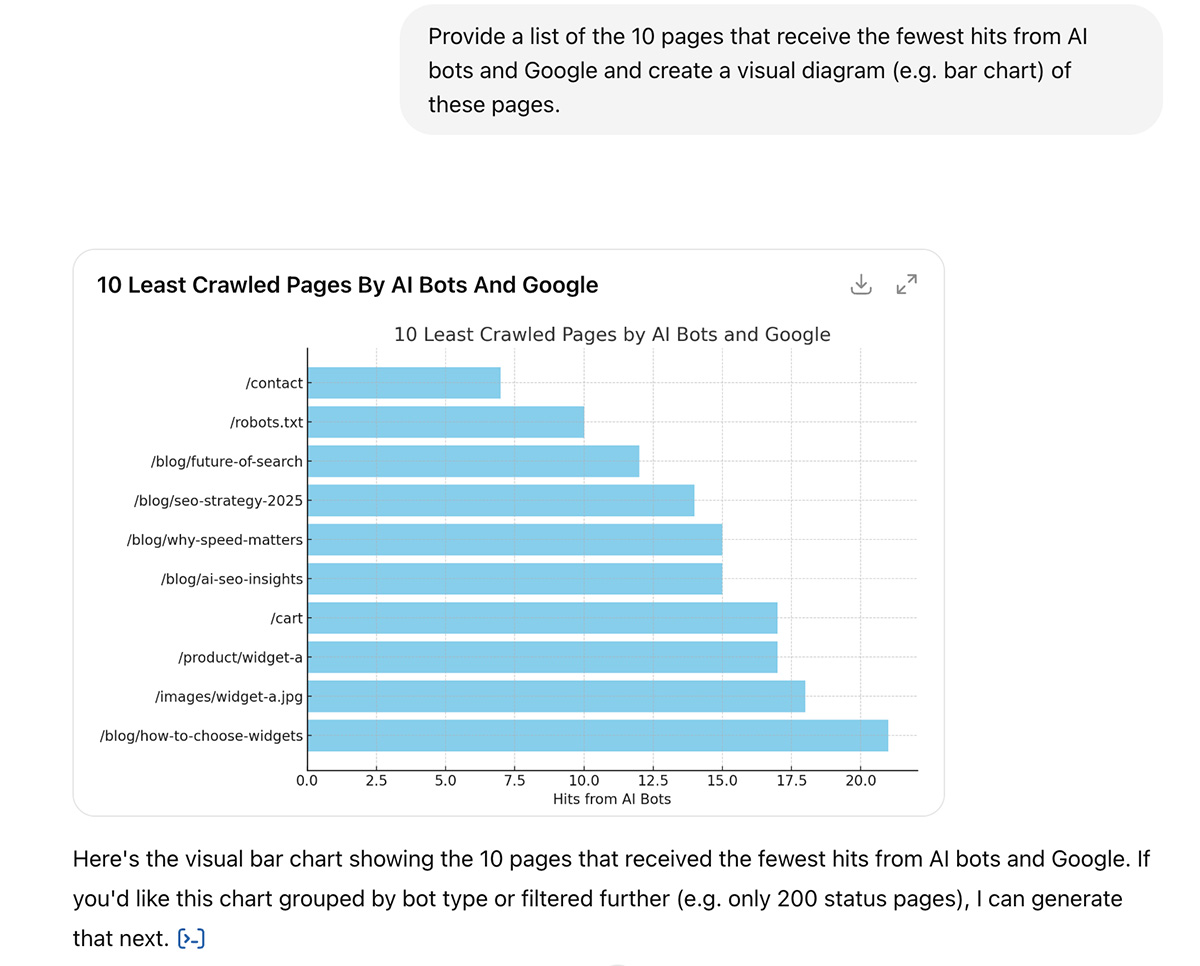
This will allow you to identify any important pages on your website that aren’t getting crawled by AI and Google.
How to Fix (example):
Our client has a section on the site with pages showing different use cases for their products i.e. /use-case/scenario/. These pages weren’t being crawled as much as we’d liked.
We checked on Ahrefs, and found that they had only 1 internal link pointing to them, from the homepage.
To do this, we went to Site Explorer > Internal links > Most linked pages > Filter by HTTP 200 Status code (so we only see live pages) > Filter URL to contain “use-cases”.
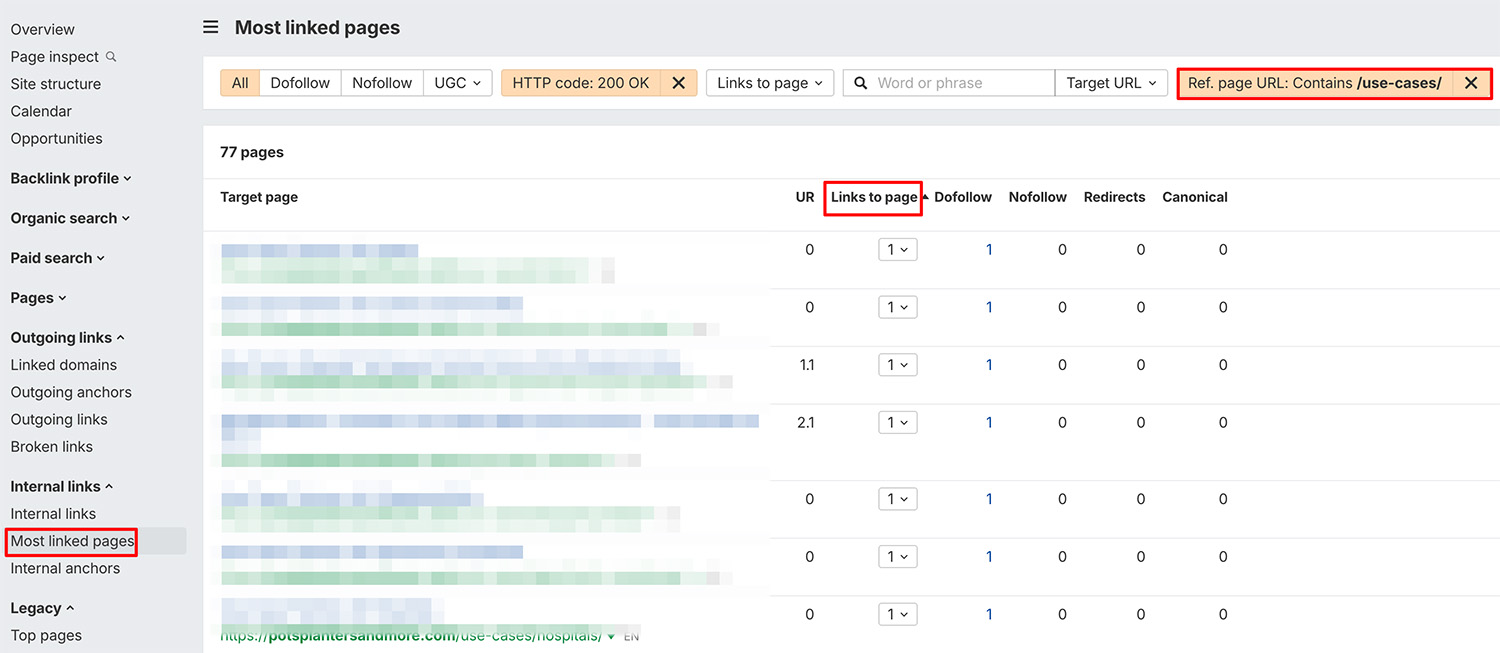
To fix this, we added internal links from relevant pages on the site, including pages that were getting more hits with AI (see next step).
For example, the client had blog posts about how to style their products for various locations, so we added internal links to and from these pages.
The pages also had thin content, there was little textual information about how customers could actually use their products in the various settings. We added unique content detailing the various use cases and how the products could actually be styled within the locations.
5. Now enter this prompt:
Provide a list of the 10 pages that receive the most hits from AI bots and Google and create a visual diagram (e.g. bar chart) of these pages.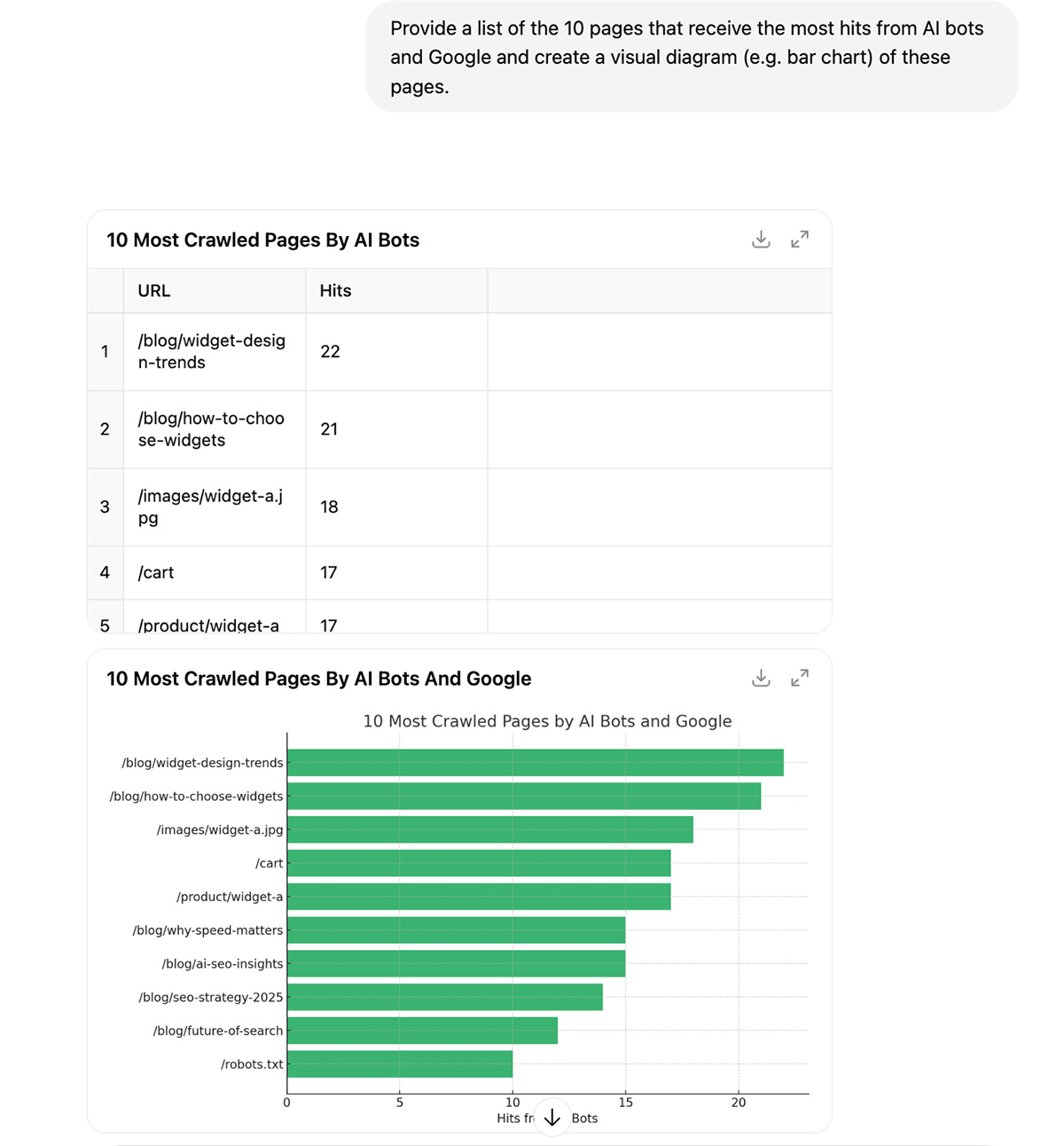
These top-crawled pages are often seen as authoritative by bots. They’re your “content hubs”.
Here’s what you can do to make the most of these pages that are crawled often:
- Expanding them with related subtopics
- Adding relevant schema (read on to find out more about that)
- Linking to related internal content that perhaps isn’t crawled as much
6. Now enter this prompt:
Highlight any crawl errors from these bots (status codes 4xx and 5xx), and flag anything that looks unusual or worth fixing.
This prompt helps identify whether any pages of value could be fixed.
In this example, GPT identified several blog posts that returned a 404 error (not found) but could still offer value to the end user (and bots).
Pages that return 404 errors can negatively impact user experience, leading to higher bounce rates. Bots will avoid these pages if not fixed, because the more broken links your site has, the harder it will be for them to access your site’s content.
Use Google Search Console’s Page indexing report to identify 404 errors.
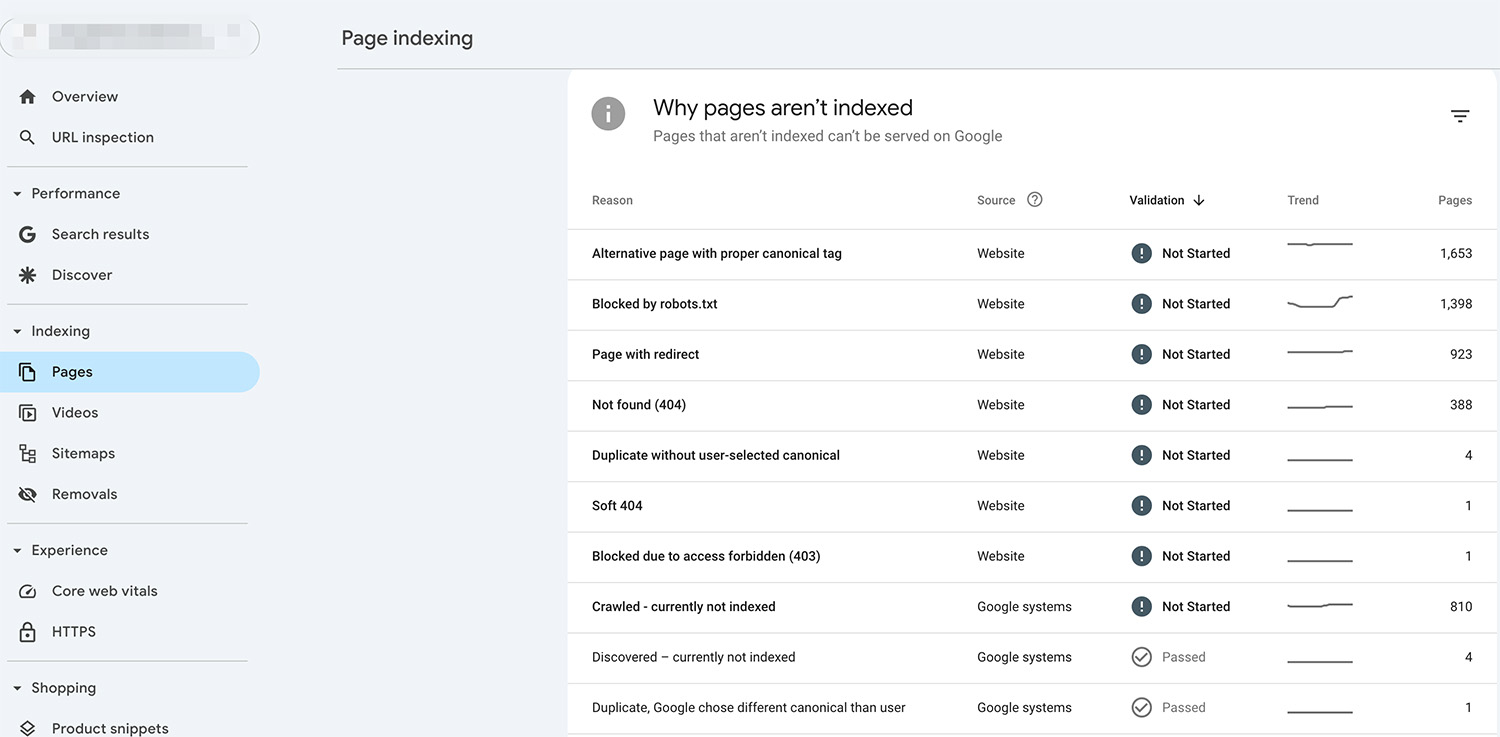
And Ahrefs Broken Link checker to find broken links on your website.
Here are the fixes:
 If there is a page that is relevant to the one returning a 404 error, implement a 301 redirect so that the user and bots are taken to the other page.
- If there’s still a need for the page you’ve deleted and there’s no suitable page to redirect users to, consider restoring the original page.
- Create a 404 page so that no visit is wasted. Add links to relevant sections of your website, like Airbnb has done.
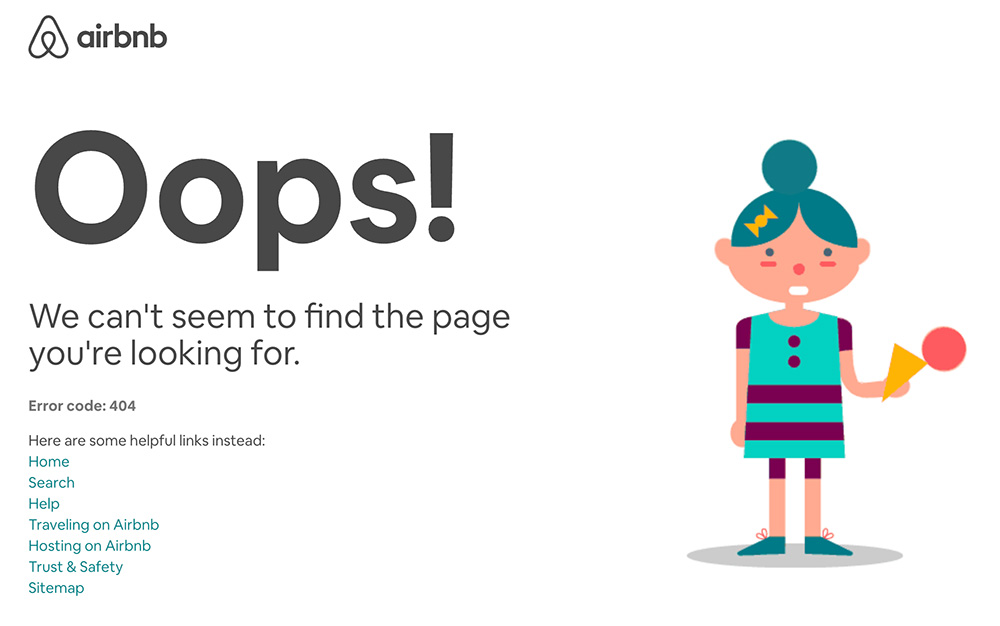
Doing this makes sure that even if some pages don’t actually exist, you’re still providing value to users, and guiding AI models to other relevant content on your site.
7. The final prompt is:
I have attached raw access log files from my website’s server.
• Bots missing key commercial pages• Pages being crawled unexpectedly often• Sudden spikes in crawl activity
Here are some tips on how to fix these:
- Add Internal Links – link to these pages from your homepage, blog posts, or other important pages.
- Include in Your Sitemap – make sure the pages are listed in your sitemap.xml and resubmit it to Google Search Console.
- Remove Noindex or Disallow – check that the pages aren’t blocked by robots.txt or tagged with <meta name=”robots” content=”noindex”>.
- Fix Crawl Errors – Make sure the pages don’t return 301, 404, or 500 errors. Fix broken links or redirects.
- Improve Content Quality – Use clear headings, answer real user questions, and avoid duplicate or thin content.
Again, this prompt helps identify any potential areas on your website that need looking to due to pages being crawled too much or certain pages not showing up at all.
By tapping into your log files and pairing them with AI-powered analysis, you gain a clear, actionable view of how search engines and AI crawlers interact with your site. This helps you fix crawl issues, boost visibility, and stay ahead with the constantly shifting search landscape.
Structured Data for Google’s AI Search Features
While most of your efforts should go into creating helpful, valuable content for your audience, there are also technical tactics that can improve how Google interprets your content.
One of the most effective is using structured data (also known as schema markup) to give Google clearer context about what your content is about and in turn, boosting your chances of standing out in its AI Overviews and AI Mode.
In fact, it’s one one of the key practices Google recommends to ensure your content performs well in its AI search features.
What is Structured Data?
Structured data (or schema markup) is a specific type of code you add to your pages to help web crawlers and AI systems to understand what your content represents. It follows a standard format, making it easier to categorize information accurately.
Take a recipe page, for example. You can instantly recognize a list of ingredients and cooking steps, but a search engine can’t do that without guidance.
Using schema, you can label things like ingredients, cooking time, temperature, and calories. This added context improves your chances of appearing in rich results and ensures your content is properly indexed and displayed.
Why is Structured Data Important for AI Search Visibility?
Adding structured data to your content doesn’t directly boost rankings, but it does offer a key benefit that improves how your pages perform in traditional and AI search.
Outside of AI search, pages with structured data are eligible for enhanced features like rich results, which can include star ratings, images, or quick answers.
Key Types of Structured Data
Before we dive into the key types of structured data that can boost your visibility in Google’s AI search features, it’s worth knowing that you can implement schema markup using different formats like Microdata and RDFa.
However, Google recommends using JSON-LD (JavaScript Object Notation for Linked Data). This format is easy to manage, scalable, and can be embedded within the <script> tag in the <head> or <body> of your page.
Article Schema Markup
This is essential for blogs, news, and editorial pages. It helps improve indexing, eligibility for Top Stories, and AI summaries.
Main Properties Used
- @type: “Article” (or “NewsArticle” or “TechArticle”)
- headline: Title of the article
- image: URL to the feature image
- author: Name of the author
- datePublished and dateModified
- publisher: Name and logo of the publisher
And this is the full markup as an example:
<script type="application/ld+json">
{
"@context": "https://schema.org",
"@type": "BlogPosting",
"headline": "Top Tips for Structuring Your Content",
"image": "https://example.com/images/blog-image.jpg",
"author": {
"@type": "Person",
"name": "John Author"
},
"publisher": {
"@type": "Organization",
"name": "SEO Insights",
"logo": {
"@type": "ImageObject",
"url": "https://example.com/logo.png"
}
},
"datePublished": "2024-07-01",
"dateModified": "2024-07-10",
"mainEntityOfPage": "https://example.com/blog/schema-markup-guide"
}
</script>
Here’s an example of a page on the client’s site that’s implemented Article schema:
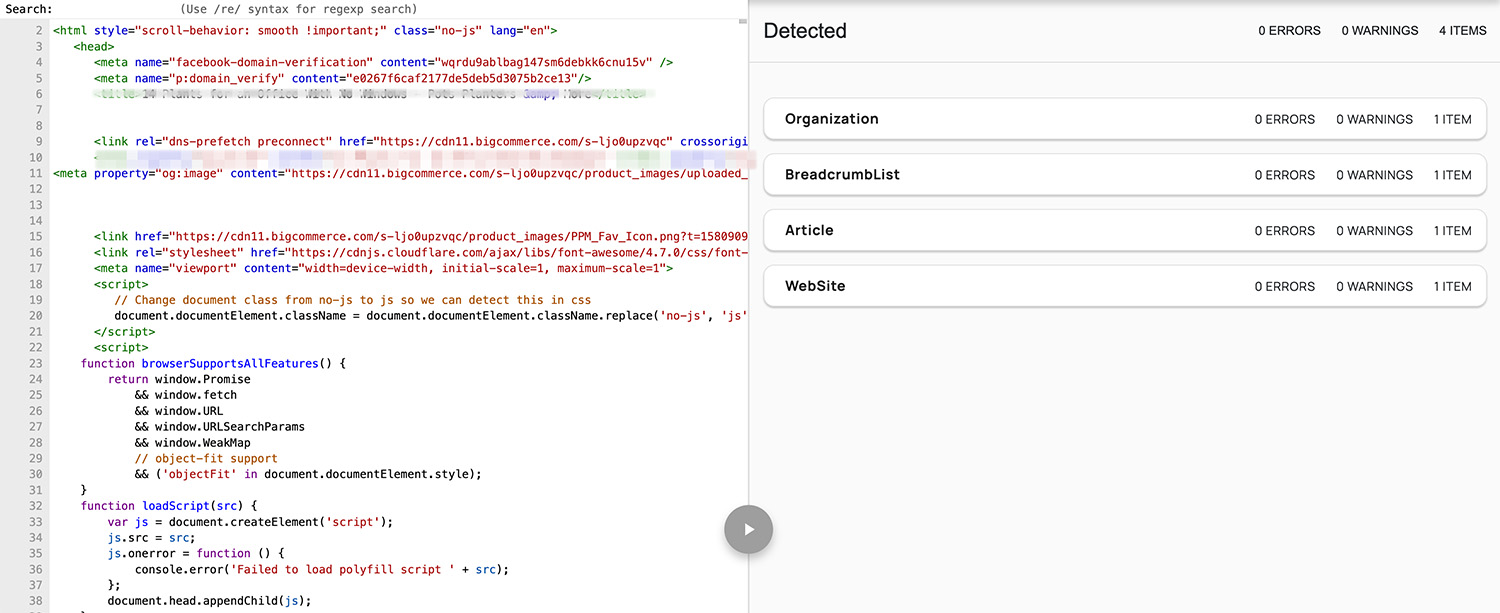
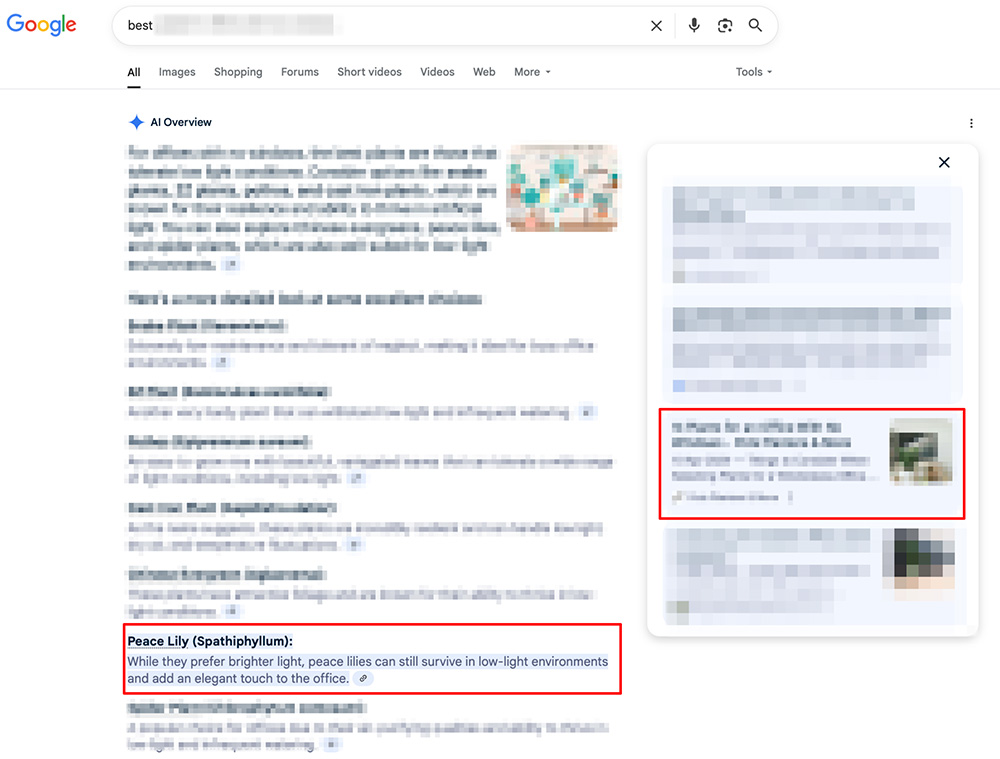
As a result, it’s now ranking for 26 relevant keywords within Google’s AI Overviews in the U.S.A.

Here’s an example of one of those keywords, where the client’s site was used as a source on a specific section of the AI-generated answer.
BlogPosting Schema Markup
Designed specifically for blog content. This schema improves how your posts are recognised and featured in AI-generated summaries, Google Discover, and Top Stories.
Main Properties Used
- @context
Value: “https://schema.org“
Description: Defines the context for the schema vocabulary. - @type
Value: “BlogPosting”
Description: Identifies the content as a blog post. - Headline
Description: The title of the blog post. Keep it clear and under 110 characters to fit in search results. - Image
Description: URL to a representative image for the blog post. Recommended size: 1200px wide for best visibility in Discover. - author
Description: The person or organisation that wrote the article.
Sub-properties:- @type: “Person” or “Organization”
- name: The name of the author
- publisher
Description: The organisation that published the blog.
Sub-properties:- @type: “Organization”
- name: Name of the publishing entity
- Logo:
- @type: “ImageObject”
- url: URL of the organisation’s logo
- datePublished
Description: The date the blog post was first published (in YYYY-MM-DD format). - dateModified (optional but recommended)
Description: The date the blog post was last updated. - mainEntityOfPage
Description: The canonical URL of the blog post itself. Helps search engines associate the schema with the correct page.
And this is the full markup as an example:
<script type="application/ld+json">
{
"@context": "https://schema.org",
"@type": "BlogPosting",
"headline": "Top Tips for Structuring Your Content",
"image": "https://example.com/images/blog-image.jpg",
"author": {
"@type": "Person",
"name": "John Author"
},
"publisher": {
"@type": "Organization",
"name": "SEO Insights",
"logo": {
"@type": "ImageObject",
"url": "https://example.com/logo.png"
}
},
"datePublished": "2024-07-01",
"dateModified": "2024-07-10",
"mainEntityOfPage": "https://example.com/blog/schema-markup-guide"
}
Here’s an example of a page with BlogPosting schema markup: